Friday, October 30, 2015

ffmpeg supports both x265 and Kvazaar HEVC encoder

Tampere University of Technology has developed Kvazaar HEVC encoder since 2014. as LGPLv2.1-licensed open-source HEVC encoder. Their goals are
  1. Coding efficiency close to HEVC reference encoder (HM)
  2. Modular encoder structure to simplify its data flow modeling
  3. Efficient support for different parallelization approaches
  4. Easy portability to different platforms
  5. Optimized encoding speed without sacrificing its coding efficiency, modularity, or portability
  6. Reduced computation and memory resources without sacrificing its coding efficiency, modularity, or portability
  7. Excellent software readability and implementation documentation
Like x265 being used in FFmpeg,

FFmpeg can make use of the kvazaar library for HEVC encoding.
Go to https://github.com/ultravideo/kvazaar and follow the instructions for installing the library. Then pass --enable-libkvazaar to configure to enable it.
It is also added in the Libav FFmpeg fork. It could be interesting to compare this to x265.

H.265 / HEVC Encoders Comparison

Recently MSU Graphics and Media Lab compared the following video encoders:


  • HEVC
  • f265 H.265 Encoder
  • Intel MSS HEVC GAcc
  • Intel MSS HEVC Software
  • Ittiam HEVC Hardware Encoder
  • Ittiam HEVC Software Encoder
  • Strongene Lentoid HEVC Encoder
  • SHBP H.265 Real time encoder
  • x265
  • Non HEVC
  • InTeleMax TurboEnc
  • SIF Encoder
  • VP9 Video Codec
  • x264
  • with objective quality metrics SSIM (structural similarity) on two platforms:
  • Desktop—Core i7 4770R @3.9 GHz, RAM 4 GB, Windows 8.1
  • Server—Xeon E5 2697v3, RAM 64 GB, Windows Server 2012
  • x265 performed the best, then Intel MSS Hevc and x264. The x265 speed gains were mostly achieved by enabling Wavefront parallel processing on multiple cores and writing critical parts of the code in assembler.


    The full free report is here.

    Thursday, October 15, 2015

    HEVC / H.265 Development Tutorial

    1. Book and Slides

    The book "High Efficiency Video Coding (HEVC): Algorithms and Architectures (Integrated Circuits and Systems) " is a good reference in addition to the spec. It covers

    (1) High-level syntax of HEVC
    (2) Block structures and parallelism
    (3) Intra-picture prediction
    (4) Inter-picture prediction
    (5) Transform and quantization
    (6) In-loop filtering 
    (7) Entropy coding
    (8) Compression performance
    (9) Decoder hardware architecture design
    (10) Encoder hardware architecture design

    Two good tutorial slides 

    2. Spec


    3. Reference Software

    The reference software for HEVC is called HM (HEVC Test Model). It is maintained in a Subversion repository. Please use a Subversion client to access the repository links directly or use the source browser for web browser access.
    4. x265

    x265 was shown to be the best overall HEVC encoder in Moscow State University's first HEVC Codec Comparison! x265 was particularly strong in the universal and ripping (high quality) use-cases. The full report is expected to be published on their website,www.compression.ru/video
    5. Analysis Tool

    Wednesday, October 14, 2015

    OS X EI Capitan Perl error: Can't locate modules in @INC

    Recently I upgraded my OS X from Yosemite to EI Capitan because many reviews showed EI Capitan run much faster than Yosemite. However I encountered a compiler problem when using perl

    "can't locate xml/parser.pm in @INC"

    It means XML::Parser module can't be found in Perl's include path (opt/local/bin/perl). To solve this problem, we may use CPAN (the Comprehensive Perl Archive Network). To get CPAN shell, run

    > sudo perl -MCPAN -eshell

    then install XML parser

    cpan[2]> install XML::Parser

    For other missing modules, we just install the requested modules, for example,

    cpan[2]> install XML::Writer


    Tuesday, September 15, 2015

    Xcode 6 - iPhone Simulator Folder

    In Xcode 6, the location of the applications on the iPhone Simulator has changed (thanks to weimenglee). Prior to iOS 8, the location of the Documents folder of your app can be found here:


    ~/Library/Application\ Support/iPhone\ Simulator/<iOS_Version>/Applications/<application_id>/Documents 

    In xCode 6, the location of the simulator has changed to when resource files are required to put in [NSBundle mainBundle]:

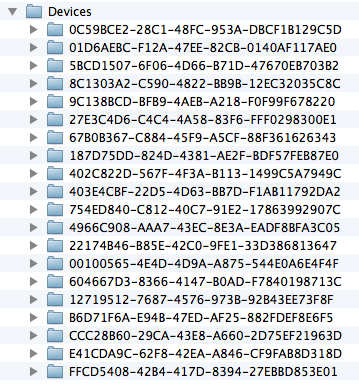
    ~/Library/Developer/CoreSimulator/Devices

    Use Finder->Go->Go To Folder, we can see all device's UUID

     
    Each folder correspond to a specific iPhone Simulator. To know which folder corresponds to which simulator, use the following command in Terminal:

    ~$ xcrun simctl list

    Then all simulator devices are listed.

    You can then go into this folder and the following path shows the folder that contains all the applications installed on this simulator:

    ~/Library/Developer/CoreSimulator/Devices/Device_UUID/data/Containers/Data/Application/

    You can now locate your specific application and find the Documents folder:

    ~/Library/Developer/CoreSimulator/Devices/Device_UUID/data/Containers/Data/Application/App_ID/Documents/

    Friday, September 11, 2015

    Perl Problem Fix on Mac OS 10.10 Yosemite

    When upgrade Mac OS X to Mac OS 10.10 Yosemite,

    dyld: Library not loaded: /System/Library/Perl/5.12/darwin-thread-multi-2level/CORE/libperl.dylib
    Referenced from: /Applications/someApp
    Reason: image not found
    Trace/BPT trap: 5
    because there are some new perl coming with this OS. For example,

     $ ls -l /usr/bin/perl*
    -rwxr-xr-x   1 root  wheel  58416 Sep  9  2014 /usr/bin/perl
    -rwxr-xr-x   1 root  wheel  35600 Sep  9  2014 /usr/bin/perl5.16
    -rwxr-xr-x   1 root  wheel  35600 Sep  9  2014 /usr/bin/perl5.18
    -rwxr-xr-x  38 root  wheel    811 Sep  9  2014 /usr/bin/perlbug
    ...
    We might install a perl through MacPort in opt/...  If so, we can uninstall it

     $ sudo port uninstall perl
    and in /usr/local/bin

     $ sudo rm perl*
    Now symlink the Perl 5.18 

     $ sudo ln -s /System/Library/Perl/5.18 /usr/local/bin/perl

    Friday, September 4, 2015

    Free Book "Fabless: The Transformation of the Semiconductor Industry"

    A free PDF version of the book is being offered. It tells really nice history of the fabless semiconductor ecosystem.
    Fabless: The Transformation of the Semiconductor Industry-book-cover-final-jpg
    You can access it via the attachment at the bottom of this wiki:

    Only registered SemiWiki members can access this wiki. You may join with:

    Followers

    About Me

    My photo
    HD Multimedia Technology player